 Vectode
ITF-14 barcodes in Adobe Illustrator
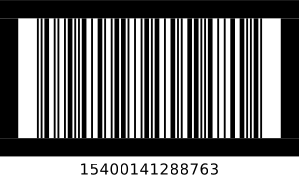
ITF-14 is the barcode on corrugated outer cases: it carries the 14-digit GTIN of the trade unit and is printed with a heavy bearer-bar frame. Vectode builds it to the GS1 specification and places it on your artboard as editable vector paths.
How to insert it in Illustrator
- Open the Vectode panel (Window ▸ Extensions ▸ Vectode) or the standalone app.
- Choose ITF-14 and type the GTIN — 13 digits and the check digit is computed, or all 14 and it is verified.
- Pick the X-dimension, bar height and bearer-bar style, then click Insert.
What Vectode gets right
- Bearer bars: a full 4.83 mm frame around the symbol and its quiet zones (for plate printing), or bars at the top and bottom only (for printing without plates)
- Wide-to-narrow ratio 2.5:1 — the GS1 target
- GS1 sizes: X-dimension 0.495–1.016 mm, bar height 31.75 mm, 10X quiet zones — with a warning below the GS1 minimum
- Human-readable digits in OCR-B below the bearer bar, at least 1.02 mm away from it
- Bar width reduction (BWR) narrows the bars only — the bearer bars stay at full thickness
Frequently asked questions
Why the heavy frame around the barcode?
The bearer bar evens out printing-plate pressure on corrugated board and stops a skewed scan line from producing a short read. GS1 makes it mandatory unless it is technically impossible; when printing without plates, bars at the top and bottom are enough.
Can I print ITF-14 directly on corrugated board?
Yes, that is what it is designed for — but GS1 advises that symbols with an X-dimension below 0.635 mm should not be printed directly on corrugate with plate-based processes. Choose 0.635 mm or more in that case.
ITF-14 or GS1-128 on a carton?
ITF-14 carries only the GTIN. If the carton also needs batch, dates or weights, use GS1-128.
One-time payment. 14-day money-back guarantee. VAT handled at checkout.
More codes in Vectode: EAN-13 & EAN-8 · UPC-A & UPC-E · GS1 DataMatrix · Data Matrix & Aztec · Pharma codes (PPN, SÚKL) · Code 128 · GS1-128 · GS1 QR & Digital Link · all features →