 Vectode
GS1-128 barcodes in Adobe Illustrator
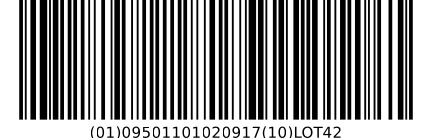
GS1-128 is the logistics barcode of the GS1 system: it carries the SSCC on pallet labels and the GTIN, batch, dates or weights on cartons. Vectode encodes the GS1 Application Identifiers with FNC1, checks the data and places the code on your artboard as editable vector paths.
How to insert it in Illustrator
- Open the Vectode panel (Window ▸ Extensions ▸ Vectode) or the standalone app.
- Choose GS1-128 and enter the data with Application Identifiers in brackets, e.g.
(01)09501101020917(17)261231(10)LOT42. - Pick the X-dimension and bar height (GS1 defaults are preset) and click Insert.
What Vectode gets right
- Check digits verified for (00) SSCC and (01) GTIN; dates, lengths and character sets of every AI validated against the GS1 rules
- FNC1 separators inserted only where GS1 requires them; the 48 data-character limit is enforced
- GS1 sizes (General Specifications, Release 26.0): X-dimension 0.495–1.016 mm, bar height 31.75 mm, 10X quiet zones — with a warning when you go outside them
- Warning when the symbol exceeds the GS1 maximum length of 165.1 mm including quiet zones
- Human-readable text in OCR-B with the AIs in brackets, as GS1 requires
Frequently asked questions
What is an SSCC?
The Serial Shipping Container Code — an 18-digit number that identifies one logistic unit, such as a pallet. It is carried in GS1-128 with AI (00) on the GS1 logistic label. Vectode verifies its check digit.
Can the barcode be smaller than an X-dimension of 0.495 mm?
GS1 allows a smaller X-dimension only on items that are physically too small for the standard size, and never below 0.250 mm. Vectode lets you go down to 0.250 mm with a warning and blocks anything smaller.
Why does the text show brackets that are not in the barcode?
GS1 requires the Application Identifiers to be shown in brackets in the human-readable text so people can read the data. The brackets are not encoded; the FNC1 separators are encoded but never printed.
One-time payment. 14-day money-back guarantee. VAT handled at checkout.
More codes in Vectode: EAN-13 & EAN-8 · UPC-A & UPC-E · GS1 DataMatrix · Data Matrix & Aztec · Pharma codes (PPN, SÚKL) · Code 128 · ITF-14 · GS1 QR & Digital Link · all features →